
Download
Local Sample Manager // Windows

Every Sample You Own, One Search Away

Import your sample folders and AudioScape sorts every sample and MIDI file into categories, reads key and BPM from the file names, and lets you drag the right sound straight into your DAW. Presets, impulse responses, and wavetables come in through their own cards.

Free Download

Windows desktop app. Open this page on your PC.

Download Anyway
v1.4.0 // ~131 MB // Windows 10 / 11
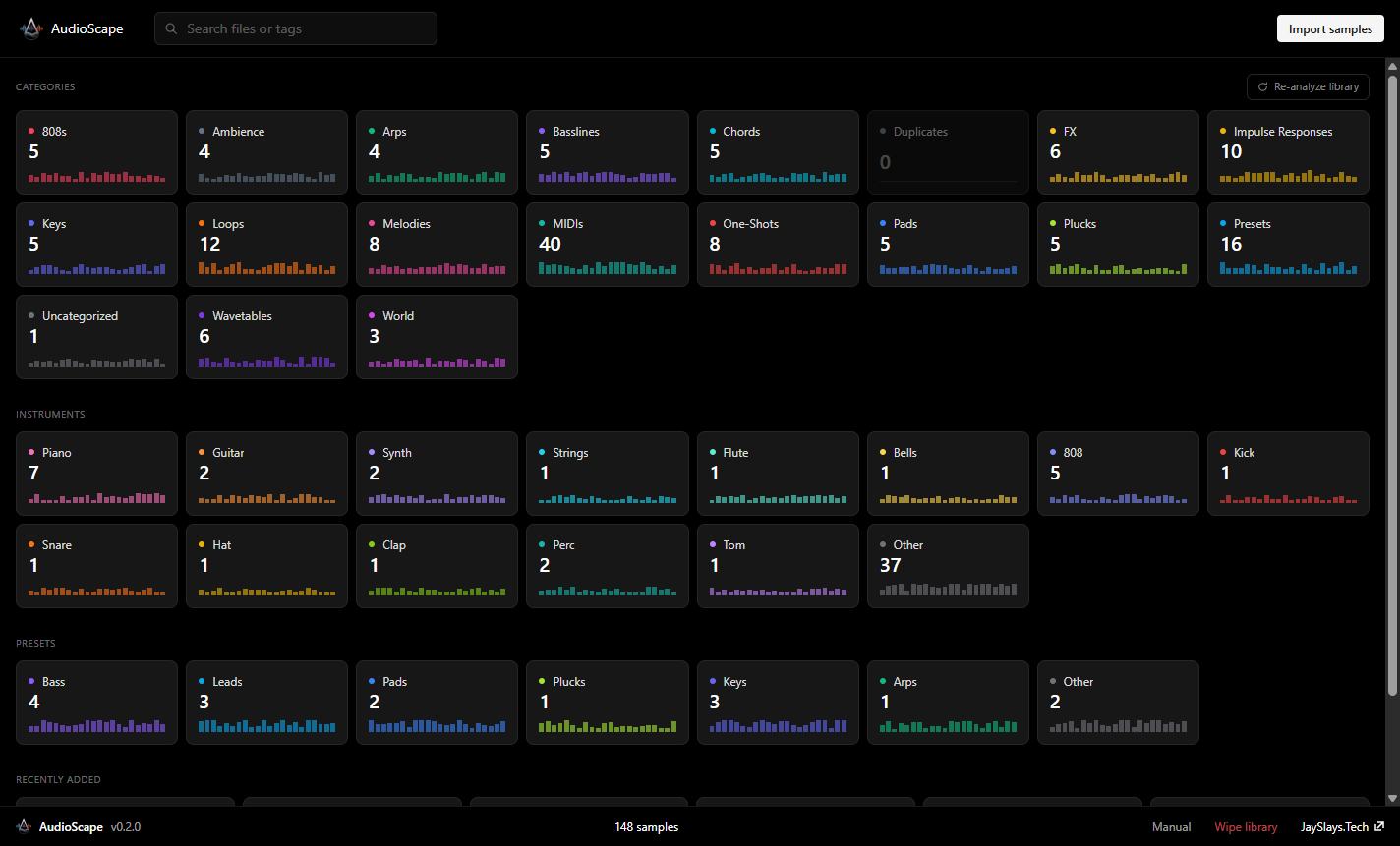
The AudioScape library browser: 19 categories, an instruments dimension, and presets, every tile showing a waveform preview.
// You Already Bought These Samples

Years of packs and downloads end up scattered across drives, in a folder graveyard nobody can search. AudioScape makes the collection you already own fast to search, right on your machine.

// What It Does

From Your Folders to Your DAW

01

Sorted on Import

Samples and MIDI land in their categories the moment they come in. Sample names lose pack and version clutter, and key and BPM come from the file name.
02

Two Ways to Browse

By category or by instrument. A piano loop shows under both Loops and Piano. Sort any list by name, BPM, key, length, or date added.
03

Preview Without a DAW

Waveform + click-to-play for audio. MIDI opens a piano roll played by a built-in synth. Never auto-plays.
04

Drag Straight Out

Grab a row and drop it into your DAW. It's a plain file drag, so it works anywhere you can drop a file.
05

It Learns Your Calls

Fix a file the sorter wasn't sure about, and similar files from the same pack follow your call next time. It never learns from its own guesses.
06

Presets, IRs, Wavetables

Not just samples. Synth presets, impulse responses, and wavetables come in through their own cards, so nothing misfiles.
07

Stem Splitter

Drop in any track and split it into vocals, drums, bass, and other on your own machine. Preview each stem and drag it into your DAW. The first split downloads a one-time ~316 MB model.
08

Favorites and Collections

Star anything to put it in Favorites, and build your own collections. One file can sit in as many as you like.
// Everything Gets a Home

19 Categories, Plus Any You Add

Samples and MIDI land in their category the moment they come in, each in its own color. Presets, impulse responses, and wavetables come in through their own cards.

  • 808s310
  • Ambience140
  • Arps220
  • Basslines460
  • Chords610
  • Duplicates12
  • FX720
  • Impulse Responses830
  • Keys390
  • Loops2,450
  • Melodies940
  • MIDIs3,200
  • One-Shots1,870
  • Pads340
  • Plucks260
  • Presets1,050
  • Uncategorized38
  • Wavetables85
  • World130
// Get It

Point It at Your Samples

Windows desktop app. Install it, hit Import Samples, and pick a folder. AudioScape copies what you import into its own library, so your originals stay put.

Download for Windows

Windows desktop app. Open this page on your PC.

Download Anyway
v1.4.0 // ~131 MB // Windows 10 / 11
// Community

Producers Hang Out Here

Join the Discord